



Integrations
CardLinks
Overview
Many issuers need a card-on-file solution that drives high conversions with little to no integration cost. Strivve CardLinks is built for exactly this. Traditional integrations require significant engineering investment. With near-zero integration overhead, issuers can move fast and measure results directly in campaign performance.
How It Works
CardLinks provides multiple methods for issuers to provision cardholder and card data, generating a unique, personalized URL for each cardholder. Each URL serves as a secure entry point into a card-on-file placement flow tied to that individual.
These URLs are designed to slot directly into existing marketing campaigns as the primary call-to-action. Supported channels include:
- Email: Embedded as a personalized link
- SMS: Sent as a short, actionable URL
- QR Code: Printed or displayed in physical or digital materials
Cardholder Experience
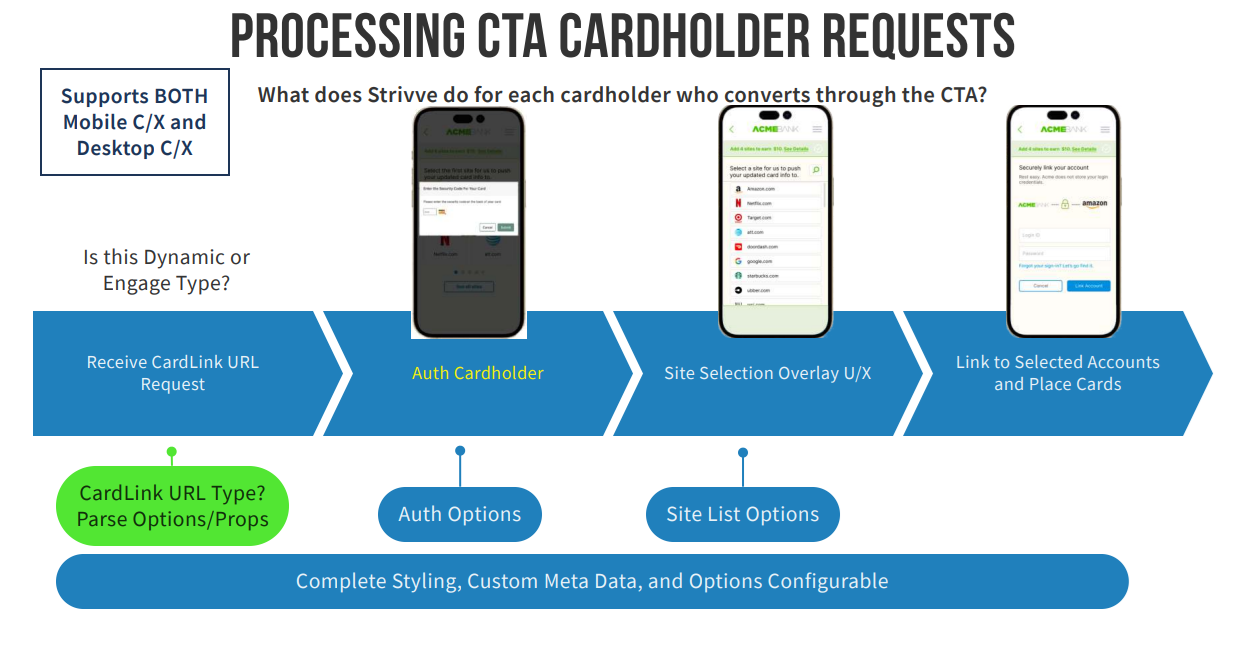
When a cardholder clicks their link, they land on a personalized page and are prompted to verify their identity before selecting merchant sites for card placement. Issuers can configure from a combination several challenge types to align with their security requirements. It is strongly recommened to use 2 challenges (the default is the challenge of CVV + ZIP code), and the Partner Portal help documents how this can be configured for a given FI.
- CVV
- ZIP Code
- PAN Last 4
- PAN Last 5
- Expiration Date
The result is a frictionless, personalized activation experience that issuers can launch through channels they already own — with no new integration required.
Use Case Example
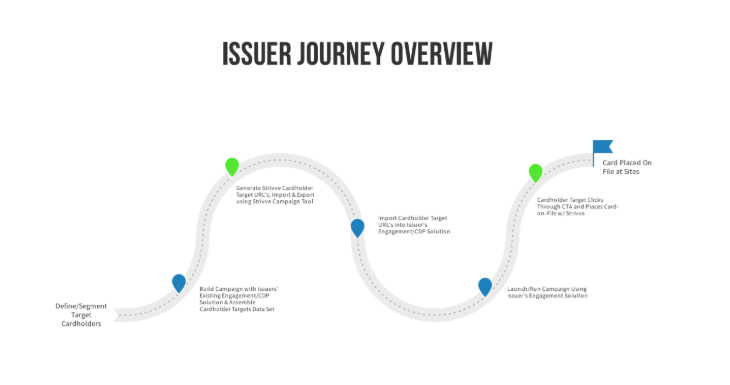
- The Issuer builds a campaign in their Customer Data Platform (CDP) with a Cardholder Targets Dataset.
- Issuer specifies and provisions card-on-file datasets into the secure Strivve PCI-DSS compliant platform via the CardSavr API. After the information is securely stored, the API will return a unique Cardholder target URL for each Cardholder data record.
- The resulting URLs are imported into the CDP solution by the Issuer where the URL is embedded into the Issuer’s Card-on-File marketing campaign as a primary call-to-action.
- Each link would represent the entry point for a personal card-on-file flow provided by CardUpdatr.
- Campaign is launched using the CDP solution.
- Cardholder clicks through the call-to-action. Upon the launch of the CardUpdatr, the Cardholder will need to respond to a challenge (whether specifying the CVV, Zip code, One-Time-Password, or other) before continuing to place cards.
- Upon successful authorization, the Cardholder places the card on file with Strivve.
- The URLs (and corresponding datasets in the Strivve Platform) can be configured to expire at a given timeframe specified by the Issuer.
Cardholder Journey
Call To Action
Card and Cardholder Data
The Card and Cardholder Data for CardLinks Engage will be published to the CardSavr platform using the Strivve CardSavr API. This information is in turn stored in the PCI-DSS compliant CardSavr platform and is securely retrieved once the URL is consumed by the Cardholder.
The base information needed to create a CardLink includes:
- Card Data
- Cardholder Billing Address
- Unique Cardholder reference ID (managed by the Issuer CDP)
Using the Partner Portal
A .csv file, provided in the Strivve file format documented below, can be uploaded via the Partner Portal and securely processed within the CardSavr platform. Once processed, the return .csv file is returned that provides a CardLink for every cardholder provided on input.
Input File Fields
The upload file format must have the following schema that can support rows of up to 1000 Cardholders. A template file is available for download from the Portal for reference.
For security, the Partner Portal supports a PGP-encrypted file. To encrypt the file, the key pair is generated via the Portal that is to be used.
The Portal also accepts unencrypted files; however, this method is intended for testing purposes only, using test card data. Because unencrypted files pose a security risk, we strongly recommend against generating or storing CSV files containing real customer card data in an unencrypted format.
The Partner Portal Help documents are this all can be configured for a given FI, and a blank .csv template with the below fields can also be downloaded.
| Field Name | Required | Description |
|---|---|---|
| cardholder.cuid | No | External reference for identifying the card to the Cardholder (e.g., a customer/cardholder ID managed within the Issuer's system). It is strongly recommended a cuid is passed in for each Cardholder to reference the returned list. If not provided, a cuid will be generated in the returned list. |
| cardsavr_card.pan | Yes | The 16-digit primary account number of the card. |
| cardsavr_card.expiration_year | Yes | The 2-digit expiration year of the card. |
| cardsavr_card.expiration_month | Yes | The 2-digit expiration month of the card. |
| cardsavr_card.name_on_card | No | The name on the card. |
| cardsavr_card.cvv_hash | No | A hashed CVV may be provided in place of the raw CVV. This must be a SHA-256 hash with Base64 encoding of the CVV. A sample JavaScript function for generating the hash is provided below this table. |
| cardsavr_card.cvv | No | Plain text CVV. Passing a CVV is optional if the Issuer does not have access to this information. |
| cardsavr_card.customer_key | No | Reserved for future use. |
| cardsavr_card.nickname | No | Nickname for the card (e.g., "Primary Card"). |
| cardsavr_card.address.address1 | Yes | Street address line 1. |
| cardsavr_card.address.address2 | No | Street address line 2. |
| cardsavr_card.address.city | Yes | City. |
| cardsavr_card.address.subnational | Yes | State, province, or region. |
| cardsavr_card.address.country | Yes | Country ("usa", "USA", "us", "US", "canada", "Canada", "ca", "CA"). |
| cardsavr_card.address.postal_code | Yes | Postal or ZIP code. |
| cardsavr_card.address.email | No | Email address of the Cardholder. |
| cardsavr_card.address.phone_number | No | Phone number of the Cardholder. |
| cardsavr_card.address.first_name | Yes | Cardholder's first name. |
| cardsavr_card.address.last_name | Yes | Cardholder's last name. |
| cardsavr_card.address.is_primary | Yes | Whether this address is the primary address for the Cardholder (TRUE or FALSE). |
CVV Hash Generation Function
const generate_b64_hash_from_string = function (string) {
    const hash = crypto.createHash("sha256");
    hash.update(string);
    const binary_hash = hash.digest();

    return binary_hash.toString("base64");
};
Output File Fields
The returned .csv file, download from the portal, provides the list of CardLink URLs with the associated customer id reference (or CUID). Using this returned file, the CardLink information for each Cardholder can be consumed by the CDP.
After processing, a new CSV file will be generated containing the results for each row in the uploaded file. Successful rows will contain a card link URL and expiration date. If there is any error in the creation of the cardholder, card, or address, a card link will not be created. Instead, the error column will contain a stringified object with the CUID that failed and the error(s) that occurred.
Using the associated customer id reference (or CUID) passed in via the upload file, the CardLink information for each Cardholder can be consumed by the CDP.
| Field Name | Description |
|---|---|
| cuid | The CUID of the cardholder. |
| last_4 | The last four digits of the card number. |
| url | The full card link URL. Clicking this link will bring the user to the verification landing page. |
| expiration_date | The date on which the card link URL expires. |
| error | If an error occurred while creating the cardholder, card, or address, this will be the only column populated in the row. It will contain a stringified object including the CUID and the error(s) encountered during processing. A row with an error will not have a card link URL. |
Using the CardSavr API
The OnDemand CardLink endpoint may be called to create a single URL. The request body consists of several separate objects. The auth object contains the credentials required to authenticate with CardSavr. The expiration object, which is optional, specifies the expiration date for the CardLink — if not provided, it defaults to 2 months from the current date. The cardholder, card, and address objects contain the necessary information to create those entities on behalf of a cardholder.
Full REST documentation can be found here: CardLinks
Creating a CardLink
const { CardLinksHelper } = require("@strivve/strivve-sdk/lib/cardsavr/CardsavrHelper");

async function createOnDemandCardLink() {

  const clh = new CardLinksHelper();

  const link = await clh.createCardLink(
    // 1. auth — credentials are passed in directly; no separate session setup needed
    {
      cardsavr_server: "https://api.YOUR_INSTANCE.cardsavr.io",
      app_name:        "your_app_name",
      app_key:         "your_app_key",
      username:        "your_username",
      password:        "your_password"
    },
    // 2. cardholder
    {
      cuid:       "cardholder-unique-id-001",
      first_name: "Jane",
      last_name:  "Doe"
    },
    // 3. card
    {
      pan:              "4111111111111111",
      expiration_month: "05",
      expiration_year:  "29",
      name_on_card:     "Jane Doe",
      nickname:         "My Visa",
      cvv:              "123"
    },
    // 4. address
    {
      address1:     "123 Main St",
      city:         "Seattle",
      subnational:  "WA",
      postal_code:  "98101",
      country:      "US",
      is_primary:   true,
      email:        "jane.doe@example.com",
      phone_number: "2065551234"
    },
    "your_financial_institution_key",  // fi_lookup_key, e.g. "acmebank"
    null                               // safe_key — null lets Strivve manage key storage
  );

  if (!link) {
    console.error("Failed to create OnDemand CardLink (see logged error above).");
    return;
  }

  // The SDK returns the raw CardsavrSessionResponse (statusCode, headers, body, call);
  // the card link data itself is in link.body.
  console.log("OnDemand CardLink:", link.body);
  // link.body.cardholder_long_token can be used to build a personalized CardUpdatr URL
}
Auth Object
The reqiored Auth Object specifies the Cardsavr authentication credentials.
| Property | Type | Required | Description |
|---|---|---|---|
| cardsavr_server | string | yes | HTTPS url of the cardsavr API endpoint. |
| app_name | string | yes | Integrator name. |
| app_key | string | yes | Integrator key. |
| username | string | yes | Username for cardsavr authentication. |
| password | string | yes | Password for cardsavr authentication. |
Cardholder Object
The required Cardholder Object specifies the Cardholder information.
| Property | Type | Required | Description |
|---|---|---|---|
| cuid | string | no | External Cardholder ID. If not provided, a random number will be generated. |
| first_name | string | yes | Cardholder's first name. |
| last_name | string | yes | Cardholder's last name. |
| string | no | Used to send card placement notifications. |
Expiration Object
The optional Expiration object specifies the expiration date for the CardLink. If not specified, CardSavr defaults it to 2 months from the current date.
| Property | Type | Required | Description |
|---|---|---|---|
| month | string | no | Two-digit month (01-12). |
| day | string | no | Day of the month (1-31). |
| year | string | no | Four-digit year. |
Address Object
The required Address object specifies the Cardholder's billing address.
| Property | Type | Required | Description |
|---|---|---|---|
| address1 | string | yes | Street address. |
| address2 | string | no | Additional address info (apt, suite, etc.). |
| city | string | yes | City name. |
| subnational | string | yes | State or province. |
| postal_code | string | yes | Zip or postal code. |
| country | string | yes | Accepted values: "usa", "USA", "us", "US", "canada", "Canada", "ca", "CA". |
| phone_number | string | yes | Phone number. |
Card Object
The required Card object specifies the Cardholder's card details.
| Property | Type | Required | Description |
|---|---|---|---|
| reference | object | yes | Reference object. If NULL, all other fields are required. |
| pan | string | conditional | Primary account number. Required if reference is NULL. |
| expiration_month | string | conditional | Two-digit expiration month. Required if reference is NULL. |
| expiration_year | string | conditional | Two-digit expiration year. Required if reference is NULL. |
| name_on_card | string | conditional | Name as it appears on the card. Required if reference is NULL. |
| nickname | string | conditional | Display name for the card. Required if reference is NULL. |
| cvv | string | no | Card verification value. |
FI Key
The key/reference to the configured Financial Institution. For example, "acmebank"
Safe Key
Optional - for future use.
Retrieving a CardLink
In response to a properly formed POST request to the OnDemand endpoint containing this information, the user will receive a CardLink containing a fully formed URL that can be accessed immediately.
const { CardsavrHelper } = require("@strivve/strivve-sdk/lib/cardsavr/CardsavrHelper");

async function getCardLink(card_link_id) {

  // 1. auth — same credentials as createCardLink
  const auth = {
    cardsavr_server: "https://api.YOUR_INSTANCE.cardsavr.io",
    app_name:        "your_app_name",
    app_key:         "your_app_key",
    username:        "your_username",
    password:        "your_password"
  };

  try {
    const chHelper = CardsavrHelper.getInstance();
    chHelper.setAppSettings(auth.cardsavr_server, auth.app_name, auth.app_key);
    const session = await chHelper.loginAndCreateSession(auth.username, auth.password);

    // 2. headers — hydrate the linked card and its cardholder into the response
    const headers = {
      "x-cardsavr-hydration": JSON.stringify(["card", "card.cardholder"])
    };

    // 3. request — a numeric id is appended to the path: GET /card_links/{id}
    const link = await session.get("/card_links", card_link_id, headers);

    // Like createCardLink, this returns the raw CardsavrSessionResponse;
    // the card link data itself is in link.body.
    console.log("CardLink:", link.body);
    return link.body;

  } catch (err) {
    CardsavrHelper.handleError(err);
    return undefined;
  }
}